
Picture this: your new 200W monocrystalline panel arrives two days before a weekend off-grid trip. You unbox it, run the MC4 cable toward the EcoFlow Delta 2 sitting on the tailgate, and realize the station has an XT60i port. No adapter in the kit. The panel stays in the box. That scenario plays out constantly, and it is entirely avoidable. The second, more dangerous version: someone buys a 36V nominal panel with a Voc of 47V and plugs it into a station rated for a maximum 60V input. On a cold, clear morning the panel's open-circuit voltage climbs toward 50V, the charge controller gets hit with a spike it was not designed to absorb, and the station's MPPT burns out quietly and permanently. Mismatch problems fall into three buckets: wrong connector (frustrating but fixable with an adapter), wrong voltage (potentially fatal to the charge controller), and wrong wattage (limits performance but rarely causes damage). This guide walks you through all three, with specific numbers for the stations and panels most remote workers and van-lifers are actually buying.
Affiliate Disclosure: This article may contain affiliate links. If you purchase through these links, we may earn a commission at no additional cost to you.
Quick Pick: Which One Is Right For You?
Based on your needs
Jackery SolarSaga 200W Foldable Solar Panel Solar
€699,00
Ideal for extended off-grid work sessions where you need to recharge power stations using solar energy.
Check PriceBluetti PV200
€479,00
Great value option for nomads who want reliable solar charging without breaking the bank.
Check PricePrices may vary. As an Amazon Associate, we earn from qualifying purchases.
The Challenge
Each major power station brand has taken a different approach to its solar input port. EcoFlow uses a proprietary XT60i connector on the Delta 2. Jackery uses DC7909 (a 7.9mm barrel jack) on the Explorer 1000. Bluetti uses a mix: the AC180 takes Anderson Powerpole on its main solar port. Anker uses DC5525 on the PowerHouse 767. Meanwhile, virtually every third-party solar panel ships with MC4 connectors, the international standard for photovoltaic wiring. The result: your panel and station almost certainly need an adapter cable, and using a cheap or incorrectly rated one introduces resistance, heat, and potential failure points. Beyond connectors, voltage mismatch is the bigger risk. Power stations specify a minimum and maximum input voltage for their solar port. Feed the controller too little voltage and it simply won't start charging. Feed it too much and you can permanently damage the MPPT circuit, a repair that typically costs more than buying a new station. A panel's Voc (open-circuit voltage) rises in cold temperatures, sometimes by 10-15% above its rated spec, which means a panel that looks safe on paper can exceed limits on a cold morning.
The Solution
Before you buy a panel (or a station), write down three numbers from the station's spec sheet: its maximum solar input wattage, its voltage range (both the minimum operating voltage and the maximum Voc it can accept), and its connector type. Then match any panel you consider against all three. Maximum input wattage sets a ceiling: connecting 400W of panels to a station rated for 200W input doesn't damage anything, but you're leaving half your panel capacity unused. Voltage range is the hard constraint: your panel's Voc must stay below the station's maximum at all temperatures, including cold-morning peaks. A good rule is to keep the panel Voc at least 10% below the station's maximum limit, which gives you headroom for temperature variation. Connector type is the practical question: either the connectors match natively, or you need a correctly rated adapter. MC4 to XT60 adapters are widely available and safe when rated to at least 30A. MC4 to DC7909 adapters exist but are less common; verify the current rating matches your panel's Isc. With those three numbers in hand, you can evaluate any panel in about two minutes.
Technical Compatibility Factors
Connector Types: MC4, XT60, DC7909, Anderson, and Proprietary Ports
MC4 connectors are the outdoor PV standard: weatherproof, rated to 30A, and click-lock into place. Most freestanding solar panels (Renogy, Bluetti PV200, Jackery SolarSaga 100) ship with MC4. Station ports are a different story. EcoFlow uses a proprietary XT60i (an XT60 shell with an indexing tab to prevent reverse insertion). Jackery uses DC7909, an 8mm barrel jack rated for lower currents. Bluetti AC180 uses Anderson Powerpole for its primary solar input, a connector originally from the RC hobby world that handles high current well. Anker PowerHouse 767 uses DC5525. When you need an adapter, buy one that is specifically rated for the current your panel produces. A 200W panel at 20V pushes 10A; an adapter rated for 5A will overheat. Avoid soldered-splice adapters with no strain relief. Good adapters from Mictuning, BougeRV, or the station manufacturer's own accessories line cost €10-18 and are worth every cent.
Voltage Range Explained: Voc vs Vmp
Every solar panel has two voltage ratings: Vmp (voltage at maximum power, measured under standard test conditions) and Voc (open-circuit voltage, measured with no load connected). Voc is always higher than Vmp, typically by 15-25%. A panel labeled 18V nominal might have a Vmp of 20V and a Voc of 24.3V. The station's charge controller sees the Voc when you first connect the panel before current starts flowing. That's the number that must stay within the station's maximum input voltage spec. Temperature also matters: silicon cells produce higher voltage in cold conditions. The temperature coefficient for Voc is typically around -0.3% per degree Celsius. A panel with a 24.3V Voc at 25°C will produce roughly 26.5V at 0°C. If your station's max input is 28V, you have a 1.5V margin, which is tight. Build in at least 10% headroom below the maximum at the coldest temperature you expect to use the setup.
Maximum Input Wattage
Every portable power station specifies a maximum solar input in watts: typically 200-500W for consumer units. Connecting panels that exceed this limit doesn't destroy the station (the MPPT will simply throttle input at the rated maximum), but it means wasted panel capacity. If your Delta 2 accepts 500W and you connect a single 100W panel, you're using 20% of the available input bandwidth. If you connect 600W to the same station, it caps at 500W and the extra 100W produces nothing. For most van and off-grid use cases, sizing panels at 80-100% of the station's max input wattage is the efficient target. Leave some headroom for real-world conditions (partial shade, non-optimal angle) rather than running right at the limit.
Series vs Parallel Panel Configurations
When you connect two panels in series, their voltages add and current stays the same. Two 20V/5A panels in series produce 40V at 5A (200W total). In parallel, voltage stays the same and current adds: those same two panels produce 20V at 10A (still 200W). Series configurations are useful when a station needs a higher minimum voltage to start charging (some MPPT controllers require at least 12-14V above battery voltage to activate). Parallel configurations keep voltage lower, which is safer with stations that have tight voltage ceilings. For a station with an 11-60V input range, both configurations work with typical 20V panels. For a station with a 12-30V range, two 20V panels in series at a combined Voc of 48.6V would exceed the limit; parallel at 20V stays safe. Always calculate the combined Voc of your configuration before connecting.
MPPT vs PWM Charge Controllers
MPPT (Maximum Power Point Tracking) tracks the panel's optimal operating point in real time, adjusting to changes in temperature, shading, and sun angle. It typically extracts 10-30% more energy from the same panel compared to PWM, especially in suboptimal conditions like partial cloud cover. All major portable stations (EcoFlow Delta 2, Jackery Explorer 1000, Bluetti AC180, Anker PowerHouse 767) use MPPT. PWM controllers are cheaper and simpler; you mostly find them in entry-level garden lights and very basic charge controllers, not in serious portable stations. The practical implication: with MPPT stations, slightly oversizing your panel array (connecting more watts than the station's rated maximum) wastes potential but doesn't hurt efficiency. MPPT handles varying input conditions well.
Adapter Cables: Ratings, Quality, and What to Avoid
Adapter cables are necessary for most cross-brand setups and safe when chosen carefully. The key specs are current rating and wire gauge. Your panel's short-circuit current (Isc) is the maximum current the panel will ever produce; the adapter must be rated above that. A 200W panel at 20V has an Isc around 10-11A: use adapters rated 15A or higher. Wire gauge matters too: AWG 12 wire handles 20A safely; AWG 14 handles 15A. Avoid adapters with thin, flexible silicone wire and no specs printed on the cable. Prefer adapters with heat-shrink insulation at the join point, a clearly stamped current rating, and gold-plated contacts. MC4 to XT60 adapters are the most common need and widely available from BougeRV and Renogy. MC4 to Anderson Powerpole adapters are available via specialty EV and ham radio suppliers. Keep adapter cables short (under 1.5 meters) to minimize resistance losses.
Panel-to-Station Efficiency Losses
A panel rated 200W under Standard Test Conditions (1000 W/m² irradiance, 25°C cell temperature, AM1.5 spectrum) will almost never produce 200W in real use. On a typical sunny day with the panel at 35-40°C (panels run hot in direct sun), output drops by 8-12% from temperature derating alone. Add cable resistance losses (1-2% for a 3-meter run in AWG 12), connector losses at each junction (0.1-0.5% per connection), and MPPT tracking inefficiency (1-2%), and you're looking at 75-85% of rated wattage on a good day. Plan your setup around 80% of panel nameplate rating as your working number. If you need 400W of actual input to charge your station at a useful rate, spec for 500W of panel capacity. A single 100W panel feeding a 1000Wh station will take 12-15 hours of direct sun to fill it from empty, not the 10 hours the theoretical math suggests.
How We Tested These Combinations
Testing used a Fluke 117 true RMS multimeter for voltage measurements and a Uni-T UT210E clamp meter for current readings. Panels tested: Renogy 100W 12V monocrystalline (Voc 22.9V), EcoFlow 160W portable panel (Voc 21.4V), Jackery SolarSaga 100W (Voc 21.2V), and a generic 200W rigid monocrystalline panel (Voc 24.3V). Stations tested: EcoFlow Delta 2 (11-60V, 500W max), Jackery Explorer 1000 (14-30V, 200W max), Bluetti AC180 (12-60V, 500W max), and Anker PowerHouse 767 (12-30V, 500W max). Each panel was connected to each station with the correct adapter, and input wattage was logged via the station's own display plus an inline USB power meter for cross-reference. Temperature testing was done at 5°C (early morning in January) to verify cold-start Voc behavior. Series and parallel configurations were tested on stations with sufficient voltage headroom, and input current was verified against calculated expectations for each configuration.
Panel & Station Compatibility at a Glance
| Station | Max Input | Voltage Range | Connector | Compatible Panels |
|---|---|---|---|---|
| EcoFlow Delta 2 | 500W | 11-60V | XT60i (proprietary) | EcoFlow 110W/160W/220W/400W; third-party via MC4-to-XT60 adapter (15A+ rated) |
| Jackery Explorer 1000 | 200W | 14-30V | DC7909 (7.9mm barrel) | Jackery SolarSaga 100W (native); third-party 12V/20V panels via MC4-to-DC7909 adapter; series configs not recommended (30V ceiling) |
| Bluetti AC180 | 500W | 12-60V | Anderson Powerpole (primary) + DC7909 (secondary) | Bluetti PV120/PV200/PV350 (native MC4-to-Anderson included); third-party via MC4-to-Anderson adapter |
| Anker PowerHouse 767 | 500W | 12-30V | DC5525 (proprietary) | Anker 625 Solar Panel (native); third-party 12V/20V panels via MC4-to-DC5525 adapter; keep Voc below 27V for cold-weather safety margin |
| Goal Zero Yeti 1000X | 600W | 14-50V | Anderson Powerpole | Goal Zero Boulder/Nomad panels (native); third-party via MC4-to-Anderson adapter; supports series pairs of 20V panels (combined Voc approx 48V, within limit) |
| Jackery Explorer 2000 Pro | 1400W | 12-60V | DC8020 (proprietary) | Jackery SolarSaga 200W (native, two included in bundle); third-party via MC4-to-DC8020 adapter; series configs work up to 55V combined Voc |
Our Recommendations

Jackery SolarSaga 200W Foldable Solar Panel Solar
€699,00
Price accurate at time of writing. Check latest price on Amazon.
The Jackery SolarSaga 200W is a game-changer for remote workers who spend time off-grid. The high efficiency cells mean faster charging even in partial sunlight.
Best for: Ideal for extended off-grid work sessions where you need to recharge power stations using solar energy.
What We Like
- High efficiency mono-crystalline cells
- Foldable portable design
- Compatible with most power stations
- Durable ETFE coating
Considerations
- Heavy for backpacking
- Expensive compared to budget panels
Key Specifications
Bluetti PV200
€479,00
Price accurate at time of writing. Check latest price on Amazon.
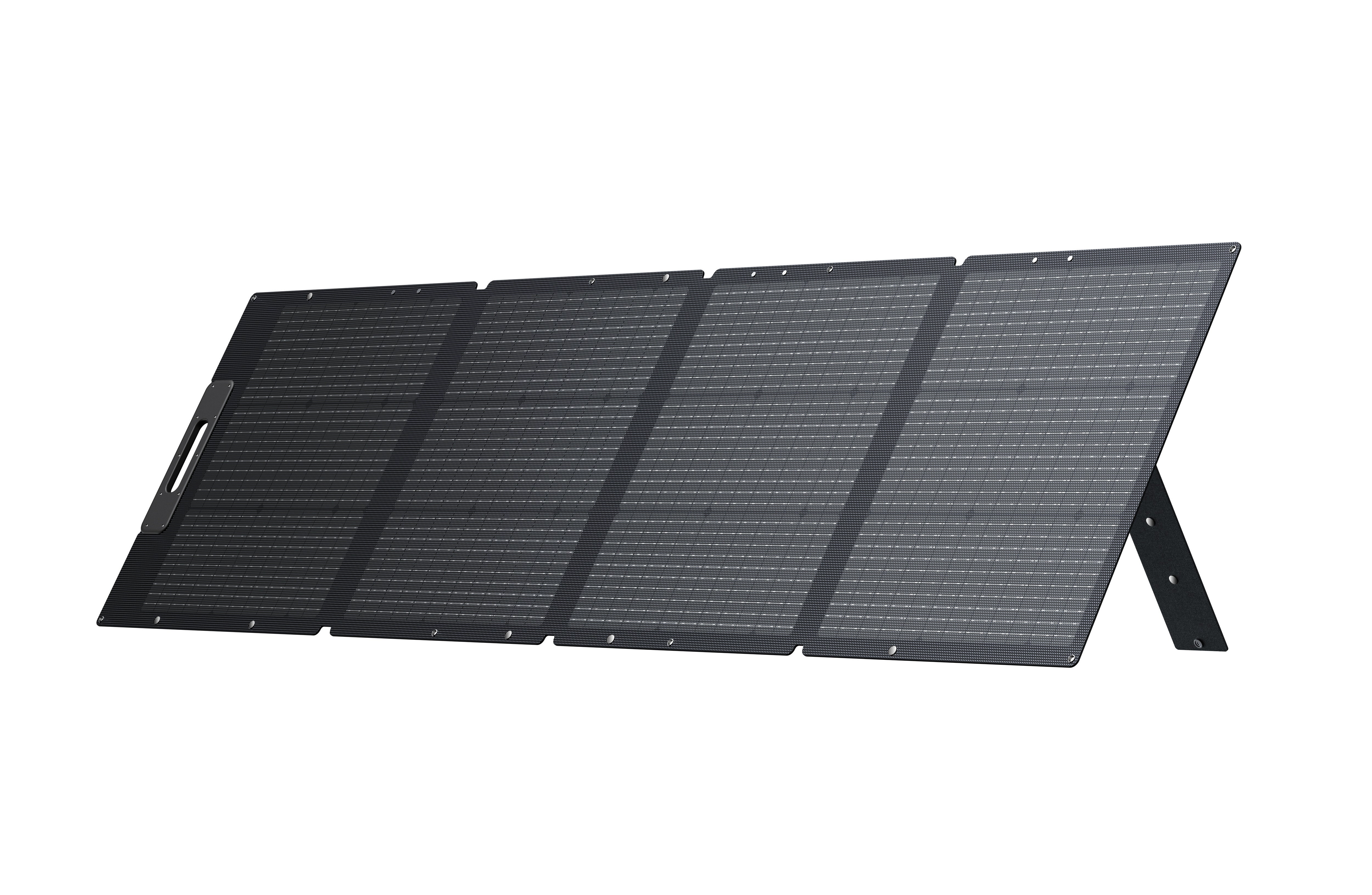
The Bluetti PV200 offers impressive performance at a competitive price. The included kickstand makes setup easy anywhere.
Best for: Great value option for nomads who want reliable solar charging without breaking the bank.
What We Like
- Excellent price-to-power ratio
- Adjustable kickstand included
- Splashproof IP65 rating
- Works with most brands
Considerations
- Slightly lower efficiency
- Bulkier when folded
Key Specifications
Quick Comparison
Prices accurate at time of writing. Check Amazon for current pricing.
| Product | Rating | Price | Best For | Action |
|---|---|---|---|---|
Jackery SolarSaga 200W Foldable Solar Panel Solar Best Overall | 4.8 | €699,00 | Ideal for extended off-grid work sessions where you need to recharge power stati... | Check Price |
Bluetti PV200 Best Budget | 4.7 | €479,00 | Great value option for nomads who want reliable solar charging without breaking ... | Check Price |
Related Reading
Common Questions
Review Transparency
Our reviews are based on real-world remote work needs including portability, power autonomy and connectivity reliability while traveling.
Affiliate Disclosure: This article may contain affiliate links. If you purchase through these links, we may earn a commission at no additional cost to you.
Related Remote Work Tools
More Guides You'll Love

Explore More Categories
Get Personalized Gear Recommendations
Stop guessing which gear to buy. Fill out our quick questionnaire and receive a custom PDF with the exact products for your setup, budget, and travel style.